The ‘Campaigns’ tab is part of Koalect’s Community Fundraising tool. This tool empowers you to manage multiple campaigns for which supporters can create projects and raise funds for your organisation.
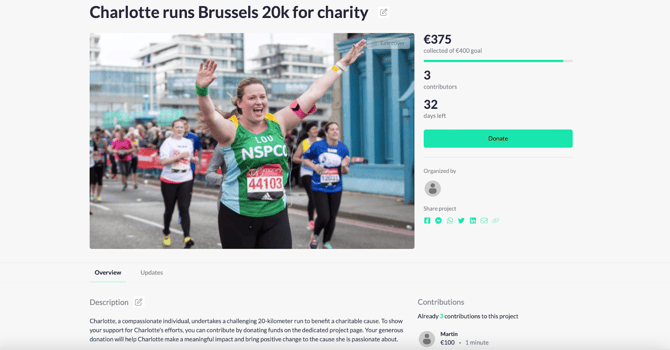
The purpose of community fundraising is to activate your close supporters to launch their own fundraising initiative such as a birthday-page, sponsor-my-run-page, or more. As a result, you are reaching a way bigger community than just your close supporters. You’re also reaching their network to expand your donor-base. In Mykoalect, we call each supporter’s initiative a ‘Project’.
Why campaigns?
For each fundraising strategy, we advise you to create a new campaign. There are multiple benefits to this:
- It allows you to set-up your individual campaign and give it a unique look and feel.
- It allows you to segment different theme’s of campaigns to show on your platform, for example: birthday, birth, sportive challenge, in memoriam, jubileam, corporate projects, etc…
- It allows you to decide which data is needed from people who interact with your campaign.
- It allows you to compare previous campaigns and learn what has succeeded in the past.
Campaign overview
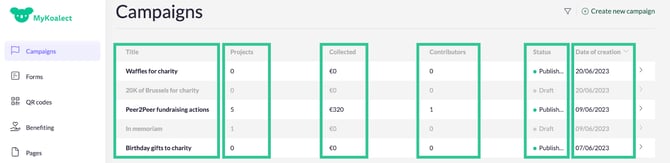
To manage all your campaigns, go to ‘Campaigns’ in Mykoalect. This tab gives a quick overview of each campaign’s performance. Below you can find the explanations of each column:
- ‘Title’.
- ‘Projects’: Number of projects users have created to support this campaign.
- ‘Collected’: Amount of money collected by all ‘Projects’ that support this campaign.
- ‘Contributors’: Amount of people who contributed to ‘Projects’ in this campaign.
- ‘Status’: Whether the campaign is published or still draft, indicating whether it is visible to users or your website or not.
- ‘Date of creation’.