
Important information on managing recurring donations via Buckaroo. Read carefully before activating monthly donations via Koalect:
- How do recurring donations through Buckaroo work?
- What is a dispute?
- How to access Buckaroo DashPlazza
- How payouts are handled in case of a dispute
How do recurring donations through Buckaroo work?
Recurring donations through Buckaroo can be made using SEPA Direct Debit (SDD) and credit cards. The first transaction serves as the start of the recurring mandate and the from then onwards the next direct debits are scheduled on the 5th of every month.
We support recurring donations via various payment methods, including Bancontact, credit cards, iDeal, KBC, and Belfius buttons.
To minimize the risk of disputes, Buckaroo uses a 1-1 payout system, holding payouts for 10 days after receiving the amounts.
What is a dispute:
Donors can request a refund for their recurring donation up to 8 weeks after the payment, without having to provide a specific reason. This is called a ‘dispute’.
To minimize the risk of disputes, Buckaroo holds the received payment for 10 days before they payout to your bank account. If there is a dispute in the first 10 days, Buckaroo will reimburse the disputed amount and freeze your wallet if the balance on your wallet is insufficient for a new payout.
For example: A €10 donation dispute leaves the wallet at -€10. If a €40 transaction comes in next, the wallet will have €30, which makes it impossible for Buckaroo to make a payout of €40, so no payout occurs. A subsequent €20 donation will bring the wallet to €50, allowing the €40 payout while holding the €20 donation because there are again insufficient funds.
To decrease the impact of disputes on your payouts, it is advisable to add a buffer amount in your Buckaroo wallet. This buffer serves as a reserve for disputed payments. When a dispute deducts funds from your wallet, the corresponding amount will be taken from the buffer, ensuring that payouts for new donations remain efficient.
You can add a buffer amount to your wallet in Buckaroo Dashplazza.
Access to Buckaroo Dashplazza:
You have access to a dedicated Buckaroo dashboard to manage your transactions, disputes, and accounting flows. Access your dashboard through the following link: (https://plaza.buckaroo.nl/). If you require access, please reach out to your account manager.
Handling payouts balance in case of a dispute:
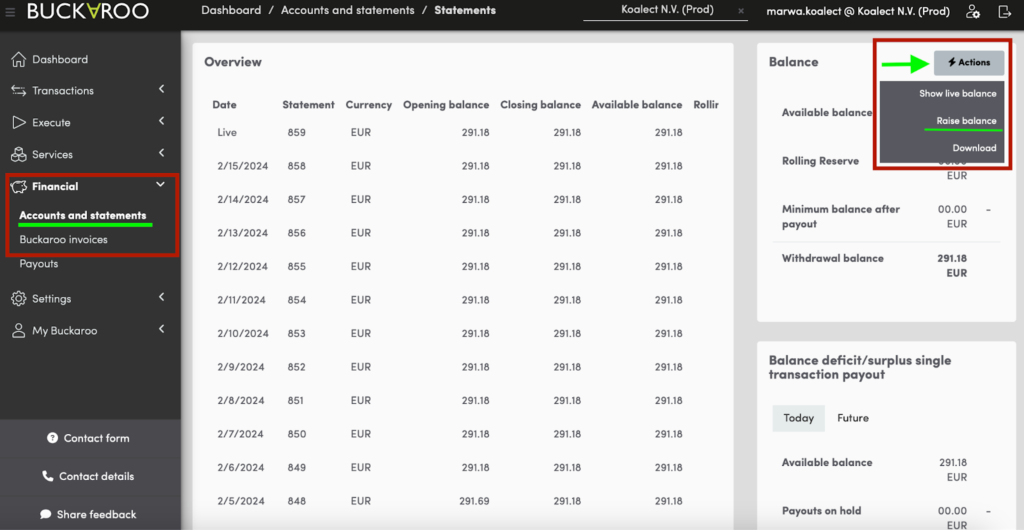
You can restore the balance and unblock payouts by adding the disputed amount to your wallet. Follow these steps:
- Visit Buckaroo Dashplazza.
- Go to 'Financials' > 'Accounts and statements'.
- Click on 'Actions' > 'Raise balance'.
- Fill in the amount for the correct balance.
- Choose the payment method and finalise the payment.
Attention: Buckaroo does not send emails for dispute notifications or balance blockages. So you should regularly check your balance to ensure that you have a buffer that allows smooth payouts, even when there are disputes.