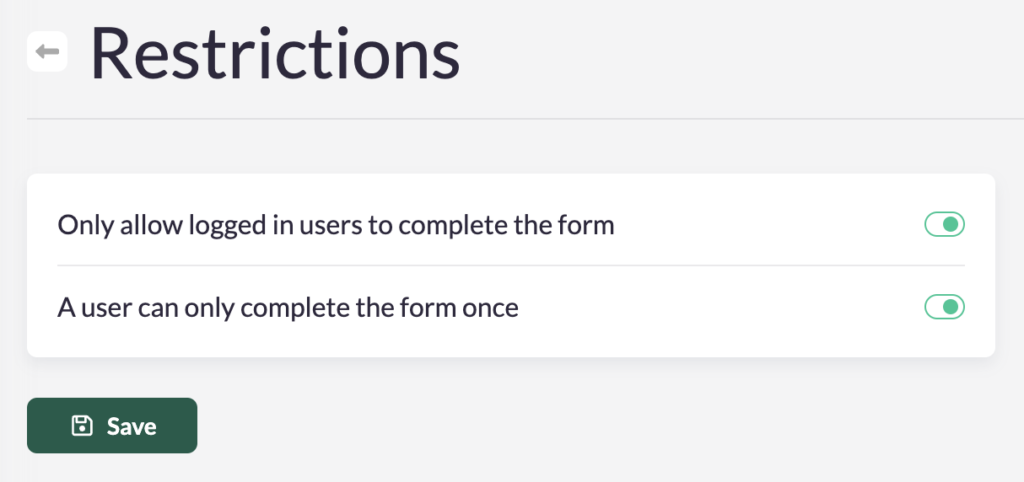
Does your organisation engage with your community in ways beyond collecting transactions? Whether it's a voting contest, a petition, or empowering a story or testimony; the 'restriction' options in forms allow you to set more rules for users to complete the form, making it easy for your organisation to execute powerful lead-generation campaigns.
By pursuing leads you collect many more contact details and information about your community, which can be used to strengthen your fundraising goals. If you are interested in these strategies, we strongly recommend to contact your account manager for more insights.
There are three options when 'restricting' your form:
- Only allow logged in users to complete the form: This means that only users who create a login can complete the form.
- Only allow verified users to complete the form: This means that only users with a verified account can complete the form. Verification is completed once the user has accepted the double-check sent to their email. Contact your account manager if you want this feature to be enabled. Attention: if this feature is enabled in your account, this is active for all your campaigns.
- A user can only complete the form once.
Note: In Koalect DO, restricting the user to only complete the form once means that the user can only contribute once to that specific project page.
To 'restrict' what users can do in your form, follow these instructions:
For Koalect GIVE forms:
- Navigate to the form where you want to add restrictions.
- Click on Settings > Restrictions.
- Enable the prefered settings to apply restrictions to the form.
In Koalect DO campaigns:
- Navigate to the campaign where you want to add restrictions.
- Click on Forms and select the form you wish to restrict.
- Click on Settings > Restrictions.
- Enable the settings to apply restrictions to the form.