
Once a specific time or milestone has been reached, you have the option to automatically send out activation mail to your project owners. These mails serve as a reminder, or prompt to encourage them to take further action, so you stay closely connected with your project owners.
Update: The new trigger type, 'Abandoned form' allows you to retarget potential donors who have failed to complete a payment.
Instructions
- Go to ‘Campaigns’ > click on the campaign you want to edit > ‘Mails’ > ‘Activation’.
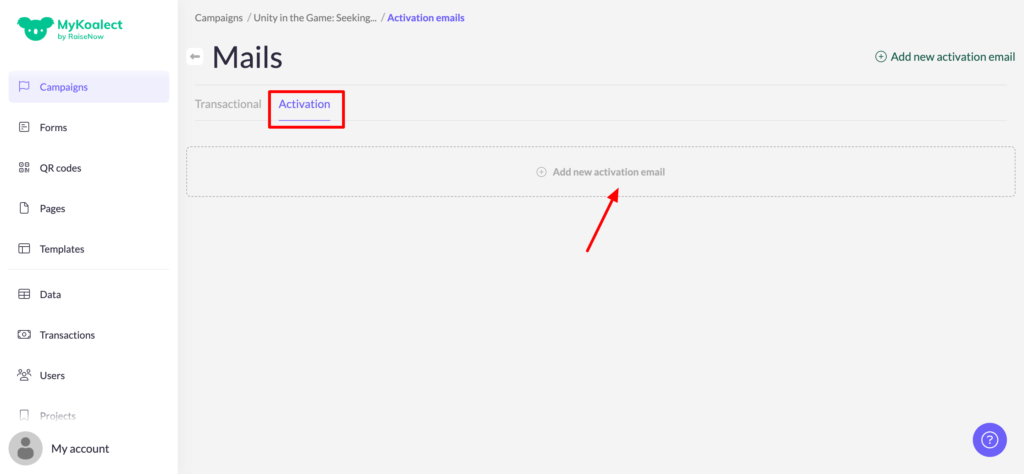
- Click on ‘Add new activation mail’.
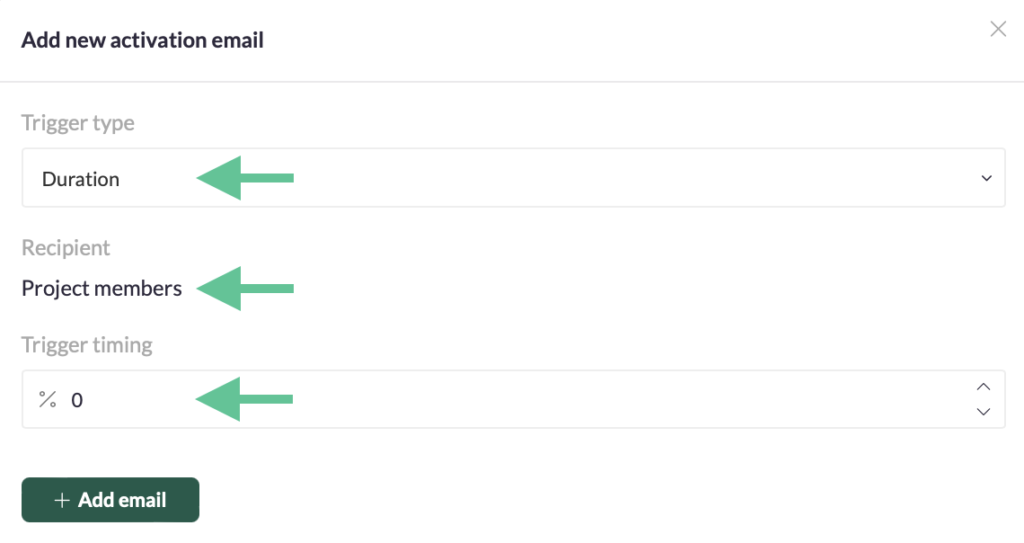
- Pick the ‘Trigger type’:
- Abandoned form: If a user fails to complete their donation within a specified timeframe, as indicated by the trigger timing, they will receive an email.
- Only Koalect DO Duration: Once the project surpasses the designated trigger timing, project members will receive an email.
- Only Koalect DO Goal: Once, the project reached a specific goal as indicated by the trigger timing, project members will receive an email.
- Set the ‘Trigger timing'.
- Add your own content to the activation email.
- Save your edits.
A few examples of Activation Mails:
- Notify project owners when the project has reached 50% of the contribution goal to encourage them for the next 50%;
- Give project owners fundraising tips when the project has reached 10% of their duration;
- Send an extra thank you message, when project owners hit 100% of the contribution goal;
- ...